
Create a Power BI Template
You create a Power BI template (.pbit) by exporting an existing report via 'File > Export > Power BI template'. The template saves the layout, visuals, data sources and DAX expressions, but not the data itself. When you open a template, a new file is created so the original remains unchanged. This lets you set up a standard structure once that can be reused across multiple reports.
Microsoft Power BI lets you use a template, also known as a template file. This creates a new Power BI file in which you can immediately use preset elements such as visuals, images and data sources.
1. Determining the purpose
Before creating a Power BI template, it’s important to determine the purpose of the template. The purpose could be to preset a background and layout for yourself or others, so people can start with the right structure right away. You could also choose to include a data source with DAX expressions already added. The template is created from an existing report. Our tip here is to remove all unnecessary elements from the report before exporting — otherwise those elements will be carried over every time the template is used.
2. Creating a Power BI template
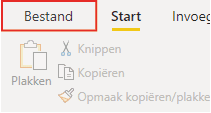
Once the report is ready to serve as a template, it can be exported. Click ‘File’ in the top-left navigation bar. This opens a menu.
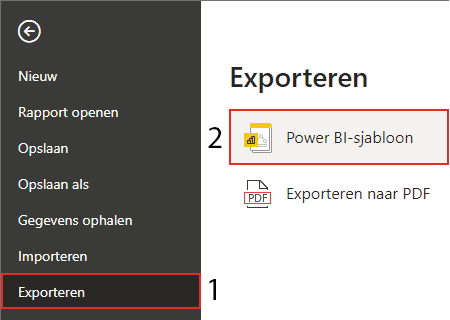
In the menu, (1) click Export and then (2) click Power BI template. You can then save this file in the desired location. Exporting to PDF is also possible, which is explained in a separate article.
To use the template, open the template file, after which a new Power BI file will be opened. If you edit and save this file, it will not be saved as a template. Hopefully you have managed to create a Power BI template. Do you have questions? Feel free to contact us.
Our tip: Remove all test data and unnecessary visuals before exporting the report as a template. A clean template is easier to use and avoids confusion for colleagues who work with it. Store the template in a shared location such as SharePoint so it is accessible to everyone.
Frequently asked questions
How do I determine the purpose of a Power BI template?
Decide in advance which elements you want to include as standard in the template. You can opt for a template with only a house style and layout, so others start immediately with the right colours and structure. You can also include a data source and DAX expressions so the data model structure is already in place. Remove all unnecessary visuals and data from the report before exporting — otherwise those elements will be carried over every time the template is used.
How do I export a Power BI report as a template?
Open the report you want to use as a template in Power BI Desktop. Click 'File' in the top left and choose 'Export'. Then select 'Power BI template'. A dialog box appears where you can enter a description. Save the template as a .pbit file in a desired location. Colleagues can open this file to start a new report with the preset structure, without overwriting the original template.
What is the difference between a Power BI template and a regular .pbix file?
A regular .pbix file contains both the report structure and the imported data. A template (.pbit) contains only the structure — visuals, layout, data sources and DAX expressions — but no data. When you open a template, Power BI creates a new .pbix file and prompts you to connect to the data source. This is useful when you want to set up similar reports for multiple clients or departments with a consistent house style and structure.